The Complete Guide to Odoo ERP,Implementation, & Modules
No jargon. Just the stuff you need to know about choosing the right Odoo Partner and setting up your business OS.
May 21, 2026
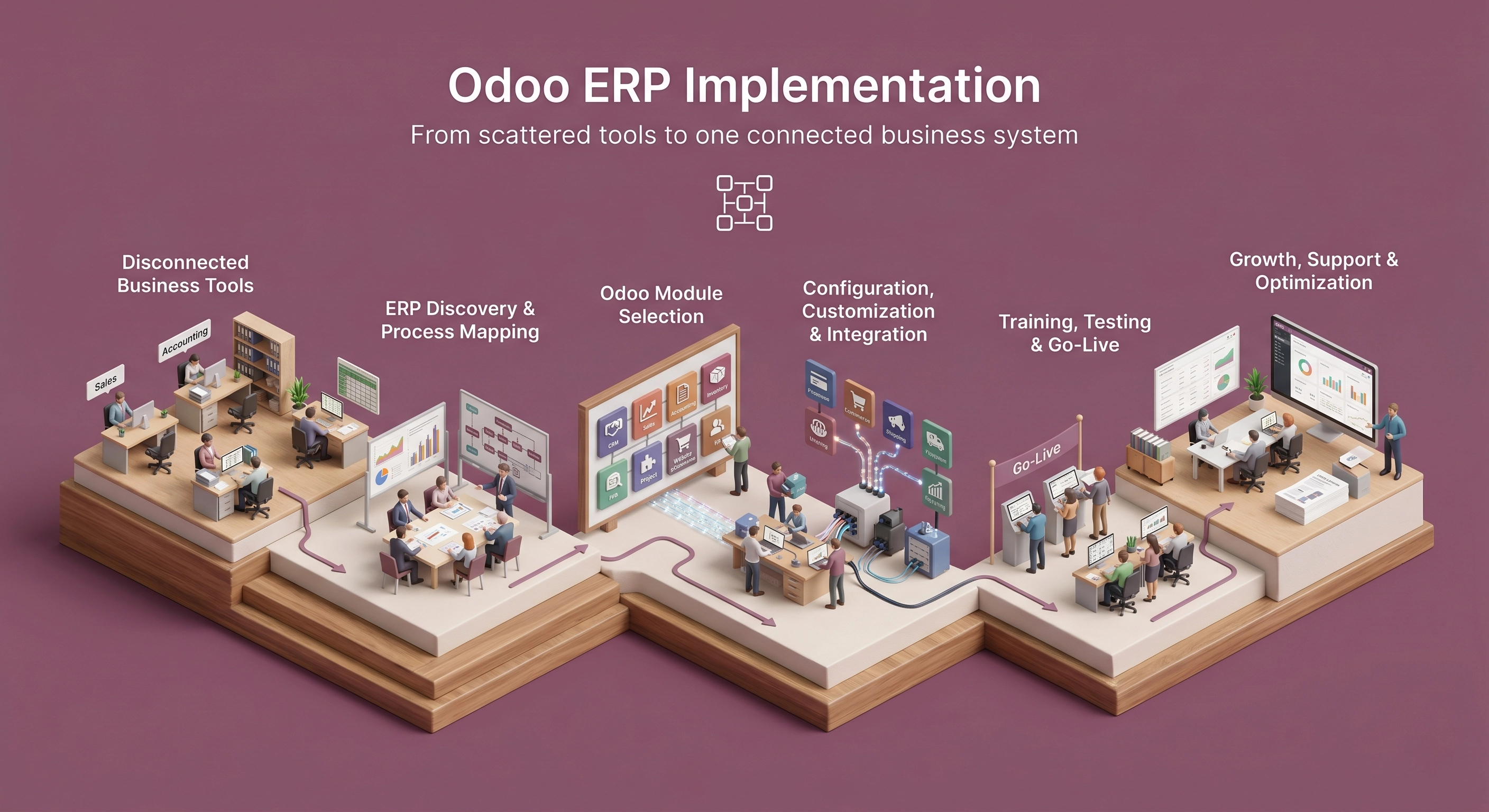
Picture a growing business. Sales happen in one tool. Accounting sits in another. Inventory lives in a spreadsheet. HR uses something else entirely. And every Monday morning, someone spends two hours copying numbers from one screen to another, hoping nothing breaks.Sound familiar?
This is how most businesses run for years. It works, until it doesn't. Reports come late. Data doesn't match. Two people update the same customer differently. And nobody really knows the full picture. At some point, owners start asking a simple question. What if all of this lived in one place?
That question usually leads them to ERP software. And increasingly, it leads them to Odoo.
What Is Odoo ERP?
So, what exactly is Odoo? Think of it as a big toolbox of business apps that all talk to each other. CRM, sales, accounting, inventory, point of sale, eCommerce, project management. Odoo describes itself as a suite of open-source business apps built to cover company needs in an integrated way.
The "ERP" part stands for Enterprise Resource Planning. Sounds heavy. It isn't. It just means one central system where every department works off the same data instead of its own private tools.
The Magic of an Integrated Business
Who uses it? Retailers, manufacturers, distributors, service companies, agencies, eCommerce sellers, field-service teams, and plenty of growing businesses that are tired of running on spreadsheets.
Why do they pick Odoo? It is modular, so you add what you need. It is open-source at its core. It covers a wide range of functions. And it scales as you grow. It can be cost-effective too, but only when it is set up properly.
How Odoo Works: Apps and Modules
Two words you will hear a lot: apps and modules.
- An app is a major business function. CRM. Inventory. Accounting.
- A module is a smaller package that adds or changes a feature within an app.
- Customization is when you tweak Odoo to fit a workflow that is unique to you.
- Integration is connecting Odoo to another system you already use.
The good part of this setup is that you do not have to swallow everything at once. Start with what hurts most today. Add the rest later.
Top Odoo Modules Every Business Should Know
There are dozens of modules. Here are the ones most businesses end up using.
CRM
Tracks leads, manages your pipeline, and prevents missed follow-ups.
Sales
Handles quotations, orders, and connects to invoicing and inventory.
Accounting
Invoices, bills, reconciliation. Needs local compliance setup.
Inventory
Stock levels, receipts, reordering rules, and barcode scanning.
Purchase
Vendor management, RFQs, purchase orders, and vendor bills.
Manufacturing
BOMs, work orders, and production planning tied to inventory.
Project
Tasks, timesheets, planning, and stages for client work.
HR
Employees, time off, recruitment. Payroll requires localization.
How do you choose? Start with your pain points. Prioritize anything tied to revenue, daily operations, or compliance. Skip customization you do not need. And roll it out in phases.
Odoo Community vs Odoo Enterprise
Odoo comes in two editions, and people get stuck here. Let's keep it simple.
Odoo Community is the open-source edition. The software is free to use, it suits simpler requirements, and it appeals to businesses that want flexibility and budget control. The catch: you will likely need technical help for hosting, maintenance, and setup.
Odoo Enterprise is the licensed edition. It costs a subscription fee, but you get extra features, official support options, and smoother access to advanced functionality.
| Area | Community | Enterprise |
|---|---|---|
| Licensing | Open-source | Licensed |
| Cost | No license fee, setup still costs | Subscription + implementation |
| Features | Core ERP functionality | Broader enterprise app set |
| Hosting | Self or partner-managed | Odoo-supported options |
| Support | Community, in-house, or partner | Enterprise support + partner |
Licensing
Cost
Features
Hosting
Support
What Is an Odoo Ready Partner?
An Odoo Partner is simply a company you hire to help with Odoo work. Odoo runs an official ranking system: Ready, Silver, and Gold.
Official partners are trained on the product, get access to Enterprise source code, have a direct line to Odoo, and sit in a transparent ranking system. A good partner brings product knowledge, implementation guidance, training, and a clear escalation path.
Alpha Dezine is an Odoo Ready Partner. Our job is not just to install software. It is to understand how you operate, configure the right modules, customize only where needed, and support your team after go-live.
Odoo Implementation Services Explained
So you have decided to go with Odoo. Now what? Installing Odoo takes minutes. Implementing it means planning, configuring, migrating data, training, and launching. Skip the thinking, and you will just rebuild your old problems inside shiny new software.
Discovery
Study current workflows, pain points, and reporting needs.
Process Mapping
Translate real operations into Odoo workflows.
Module Selection
Choose apps based on need, not features.
Config & Customization
Set permissions, taxes, workflows. Customize ONLY when justified.
Data Migration
Move customers, vendors, stock, and history over accurately.
Testing & Training
Test permissions/reports. Train the team (crucial for adoption!).
Go-Live
Launch, fix early issues, and plan for optimization.
How Much Does Odoo Implementation Cost?
It depends. Cost is shaped by your edition, number of users, number of modules, hosting choice, data migration complexity, customization, integrations, training, and ongoing maintenance.
The "Real" Cost Breakdown
A common misstep is budgeting only for software licenses. High-value deployments invest heavily in configuration and training.
- Implementation & Config45%
- Customization20%
- Training & Support25%
- Software License10%
The cheapest implementation can turn into the most expensive one. Weak discovery and sloppy configuration lead to rework, and rework costs real money.
Odoo Implementation Roadmap
Phase 1: Assess
Identify pain points, list current tools, set goals.
Phase 2: Choose
Compare Community vs Enterprise and select priority modules.
Phase 3: Plan Scope
Separate must-haves from nice-to-haves.
Phase 4: Deliver
Configure, customize, and migrate data. Technical execution.
Phase 5: Adopt
Train users and test workflows thoroughly.
Phase 6: Optimize
Go live, monitor usage, fix issues, and grow.
Odoo ERP FAQs
The Bottom Line
Odoo is a modular ERP suite. You can choose Community or Enterprise. Modules should be picked based on how your business actually works, not on long feature lists. And the quality of your implementation matters just as much as the software itself.
The right partner reduces risk and improves adoption. The wrong one just gives you new software with old problems.
How Alpha Dezine Helps SMBs Move to Odoo
For most small and medium businesses, the hard part of an ERP project is not the software. It is figuring out where to start, what to skip, and how to make the switch without disrupting daily work.
We start with a conversation about your business, not a list of modules. If you are weighing Odoo, a short consultation is often enough to tell you whether it fits, what a sensible first phase looks like, and roughly what it would take. No pressure.
Schedule a Demo Today


© 2026 Alpha Dezine. All Rights Reserved.
