You finally received the email: your company has been approved to produce merchandise for a university you’ve spent months pursuing.
Your sales team is already reaching out to campus bookstores and regional retailers. Design has six product concepts queued up, and production is asking when they can start running prints.
Everyone wants to hit the ground running. But before anyone touches a printing press or embroidery machine, someone inevitably asks:
"Can we actually start manufacturing right now?"
The short answer? Almost certainly not.
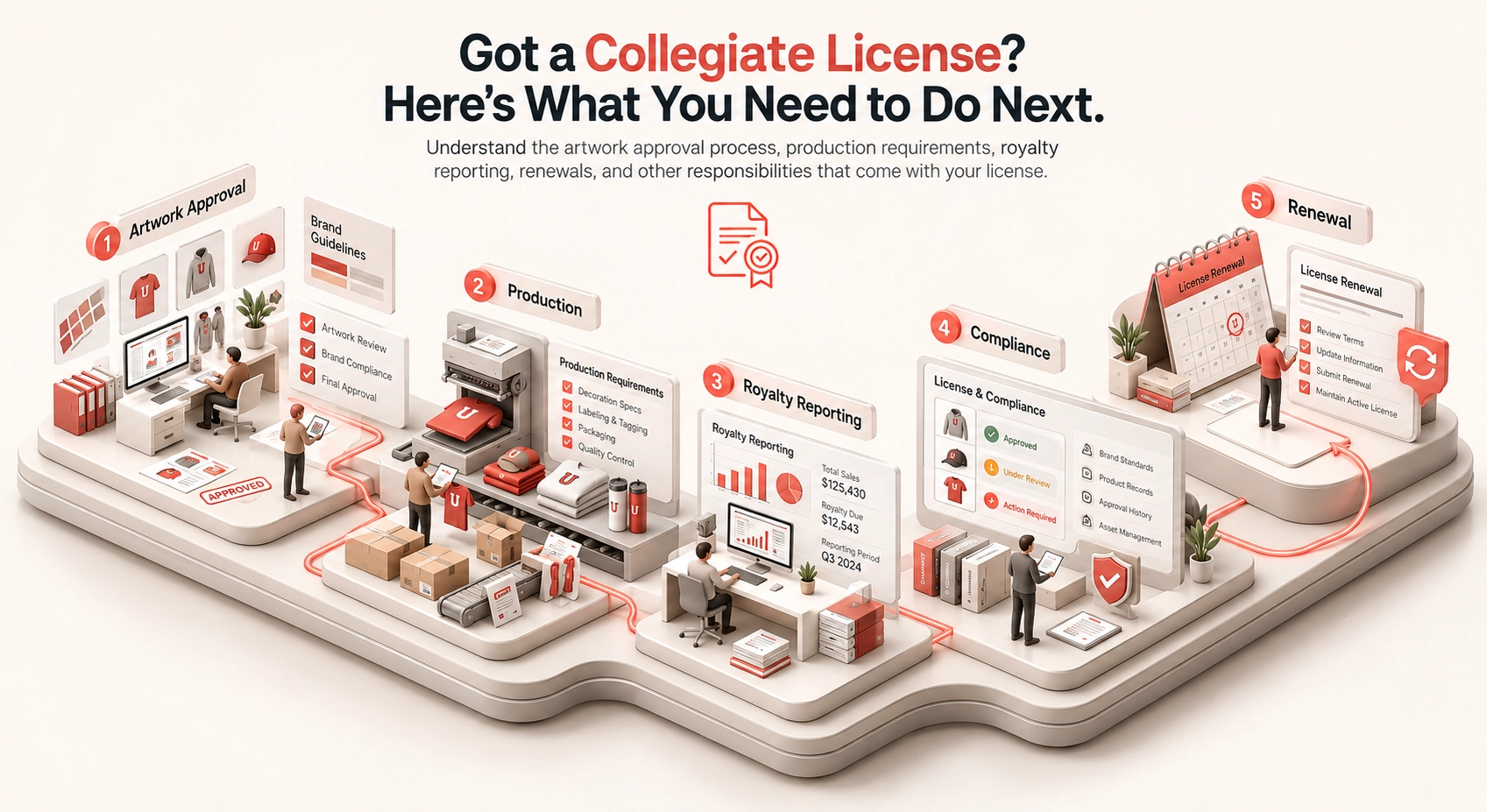
Winning a collegiate license and actually operating one are two very different disciplines. Getting the license simply opens the front door; operating it involves navigating brand style guides, digital approval portals, authentication holograms, quarterly royalty calculations, and tight renewal windows.
Here is the operational blueprint for what actually happens next, and how to keep your new license in good standing.
The Gap Between "Approved" and "Active"
It is easy to get ahead of yourself when an acceptance notification arrives, but being accepted is not the same as being active.
For example, when CLC (Collegiate Licensing Company) approves an application, your agreement remains conditional until several mandatory requirements are met:
- Executing the formal license agreement.
- Submitting Certificates of Insurance (COIs) naming the institution and licensing agency as additional insureds.
- Disclosing your complete supply chain, including manufacturing and embellishment facilities.
- Paying advance royalties or administrative onboarding fees.
- Ordering authorized hangtags or holographic authentication labels.
The 5 Mandatory Requirements for Active Status
Click each milestone to inspect the agency onboarding process
Only after these onboarding steps are verified by the agency does your status officially switch to Active.
Rule of Thumb:
Until your portal dashboard explicitly reflects an active status for that specific university and product category, do not run production. Unlicensed production, even while onboarding paperwork is pending, can lead to immediate contract revocation.
The Portal Maze: Who Manages What?
There is no central clearinghouse for collegiate trademark licensing. Depending on the institutions you signed with, you will manage approvals and financial reporting across completely different platforms:
Over 700 institutions (e.g., Alabama, Michigan, Texas)
Select universities, national fraternities/sororities
Mid-major universities, collegiate conferences
Specialized programs (e.g., Columbia, Boston University)
Independent programs (e.g., Harvard, MIT, Ohio State)
| Licensing Agent / Model | Primary Management Portal | Common Client Institutions |
|---|---|---|
CLCMajor Enterprise | Brand Manager 360 | Over 700 institutions (e.g., Alabama, Michigan, Texas) |
Affinity LicensingGreek & Collegiate | Affinity Gateway | Select universities, national fraternities/sororities |
Nexus Licensing GroupMid-Major / Conf | BrandComply | Mid-major universities, collegiate conferences |
Exemplar AssociatesBoutique / Selective | Workspace | Specialized programs (e.g., Columbia, Boston University) |
Independent / In-HouseDirect School | Direct / Internal Systems | Independent programs (e.g., Harvard, MIT, Ohio State) |
Because each platform has its own file-naming protocols, turnaround times, and submission interfaces, operating across multiple schools quickly turns into an administrative challenge.
Step 1: Verify Scope and License Type
Never assume a collegiate license grants open access to produce any item featuring school marks. Your agreement defines strict boundaries around channels, products, and marks.
A common trap is the distinction between Internal and Retail licenses:
- Internal Licenses: Permit sales directly to official university departments, student organizations, and affiliated entities (often royalty-exempt or discounted). You cannot sell these goods to third-party retailers or directly to consumers online.
- Retail / Standard Licenses: Permit distribution into campus bookstores, independent retail, and e-commerce channels, carrying full royalty obligations.
Internal vs. Retail License Comparison
License Issued
Agreement executed with collegiate institution
License Issued
Agreement executed with collegiate institution
Before accepting purchase orders, confirm that your license type matches the distribution channel and that your product category (e.g., apparel, headwear, hard goods) is explicitly cleared in your agreement.
Step 2: Master the Artwork Approval Workflow
Securing a license does not grant blanket approval to use school marks at will. Every unique SKU and graphic combination must be submitted through the appropriate portal before cutting fabric or ordering blanks.
What the University Reviewer Looks For
Mark Integrity
Are the logos warped, stretched, outlined incorrectly, or recolored outside official Pantone Matching System (PMS) guidelines?
Clear Space & Sizing
Does the graphic satisfy minimum clear-space buffers around primary wordmarks and crests?
Restricted Marks
Certain assets, such as university presidential seals or commemorative centennial marks, are often restricted to official university stationery or formal campus events.
Co-Branding & Third-Party Marks
Placing your brand logo, a retailer logo, or a student-athlete's likeness (NIL) alongside a school trademark requires strict separation rules or distinct contractual addendums.
Expect revisions. Even experienced apparel designers routinely receive revision requests for PMS color shifts or badge positioning. Build at least 10 to 15 business days into your production calendar for review cycles.
Expect revisions. Even experienced apparel designers routinely receive revision requests for PMS color shifts or badge positioning. Build at least 10 to 15 business days into your production calendar for review cycles.
Step 3: Clear Pre-Production & Labeling Checks
Once artwork is marked "Approved" in the portal, there are still pre-production requirements to satisfy:
- Authentication Labels: Programs working through CLC and other agencies mandate the use of official holographic hangtags or heat-seal labels (Officially Licensed Collegiate Products / OLCP labels). You must purchase these from authorized tag suppliers well before packaging.
- Archiving the Approved File: Retain the exact proof bearing the system stamp or approval code. If a graphic tweak is made during pre-press, it must be resubmitted. Running an altered version of an approved file voids compliance.
- Factory Disclosures: If you shift production to a subcontractor or a new embroidery shop, that facility must be registered and cleared under your supply chain disclosure agreements.
OLCP Holograms
Mandatory anti-counterfeit hangtags or heat transfers from authorized tag suppliers.
Stamped Proof Archive
Retain un-altered proof with system stamp. Any post-approval tweak voids license.
Subcontractor Registry
Embroidery & screen printers registered in FLA/WRC portal prior to manufacturing.
Step 4: Establish Royalty Tracking Early
Collegiate royalty reporting is not an ordinary end-of-quarter bookkeeping task; it requires granular data capture at the SKU level.
Royalty Reporting Calculation Example
Model an illustrative royalty calculation. Your actual royalty base, permitted deductions, rate, and reporting schedule are defined by the applicable license agreement.
Illustrative royalty base
Do not assume returns, freight, or other deductions are permitted.
Each licensing body sets its own reporting parameters:
- Reporting Frequency: Varies by agency, license type, and institution. Some programs require quarterly reporting while others require monthly reporting. Follow the schedule in the active license agreement and licensing portal.
- Zero-Sales Reporting: Some programs require a no-sales report even when reportable sales are $0. Follow the agreement and portal instructions for each institution.
- Advances & Minimum Guarantees: Confirm whether an advance or minimum guarantee applies and how it is credited against royalties under the applicable agreement.
Manually reconciling sales data across multiple portals and spreadsheets increases the risk of late filings, inconsistent records, and audit discrepancies.
Step 5: Maintain Compliance for Seamless Renewals
Collegiate licenses are rarely permanent; they typically renew on an annual cycle. Renewal is contingent upon active compliance throughout the year:
- Insurance Expirations: Upload renewed Certificates of Insurance (COIs) at least 30 days before expiration. A lapsed COI freezes portal access immediately.
- Labor Standards & Audits: Many universities require adherence to the Fair Labor Association (FLA) or Worker Rights Consortium (WRC) codes of conduct.
- Contract Renewal Deadlines: Know which licenses renew automatically versus those that require proactive renewal applications, updated financial statements, or annual administrative fees.
The Multi-School Bottleneck (And How to Scale)
Managing one university is manageable. Managing twenty universities across CLC, Affinity Gateway, and independent portals is an operational challenge.
The Multi-School Portal Routing Challenge
Where Internal Communications Break Down:
"Which version of the Homecoming hoodie did University B approve?"
"Did the embroidery shop pull the approved file or the preliminary concept?"
"Are our liability certificates up to date across all four platforms?"
When multi-school programs expand, internal communications often break down:
- Which version of the Homecoming hoodie did University B approve?
- Did the embroidery shop pull the approved file or the preliminary concept?
- Are our liability certificates up to date across all four platforms?
A single unapproved design reaching store shelves can trigger cease-and-desist notices, inventory forfeiture, and canceled contracts.
Where Alpha Dezine Fits
Alpha Dezine provides the internal operating layer around the licensing portals your team already uses.
Sales, Design, Licensing, Production
Design intake, Approved assets, Submission status, Revision history, Production-ready files, Royalty-ready data
University & Agency Portals (System of Record)
Centralize design intake, approved asset libraries, submission status, revision history, production-ready files, and royalty-ready SKU data across schools. Sales, design, licensing, and production can see what was submitted, what changed, what is approved, and which file is cleared for production.
University and agency portals remain the system of record for formal approval. Alpha Dezine organizes the work around them so your team can maintain a consistent internal record from intake through submission, approval, and production.
Post-Licensing Checklist
Post-Licensing Release Checklist
Use this quick-start operational checklist to guide your team through each release
Confirm insurance, factory disclosures, and onboarding fees are complete in the primary portal.
Check whether the purchase order matches your license type (Retail vs. Internal).
Verify that all marks, color swatches (PMS), and placements follow the school’s visual identity guide.
Secure mandatory agency authentication labels prior to production runs.
Ensure the production facility only has access to official, portal-approved vector files.
Tag each item in your ERP/accounting system with the correct university ID, royalty rate, and reporting calendar.
Set automatic alerts for quarterly reporting windows and annual insurance renewals.
Need Help Scaling Your Collegiate Licensing Operations?
Alpha Dezine helps brands streamline asset management, portal submissions, revisions, and compliance across dozens of universities.
Disclaimer: This guide is provided for educational purposes only and does not constitute legal, tax, or specialized licensing counsel. Requirements vary significantly by licensing agent, university, and product category. Always refer to your signed licensing agreement and portal guidelines for definitive requirements.