Claris FileMaker and QuickBooks IntegrationA Complete Guide
The fastest connection is not always the smartest one. Compare connector-based and direct API integration.
July 22, 2026
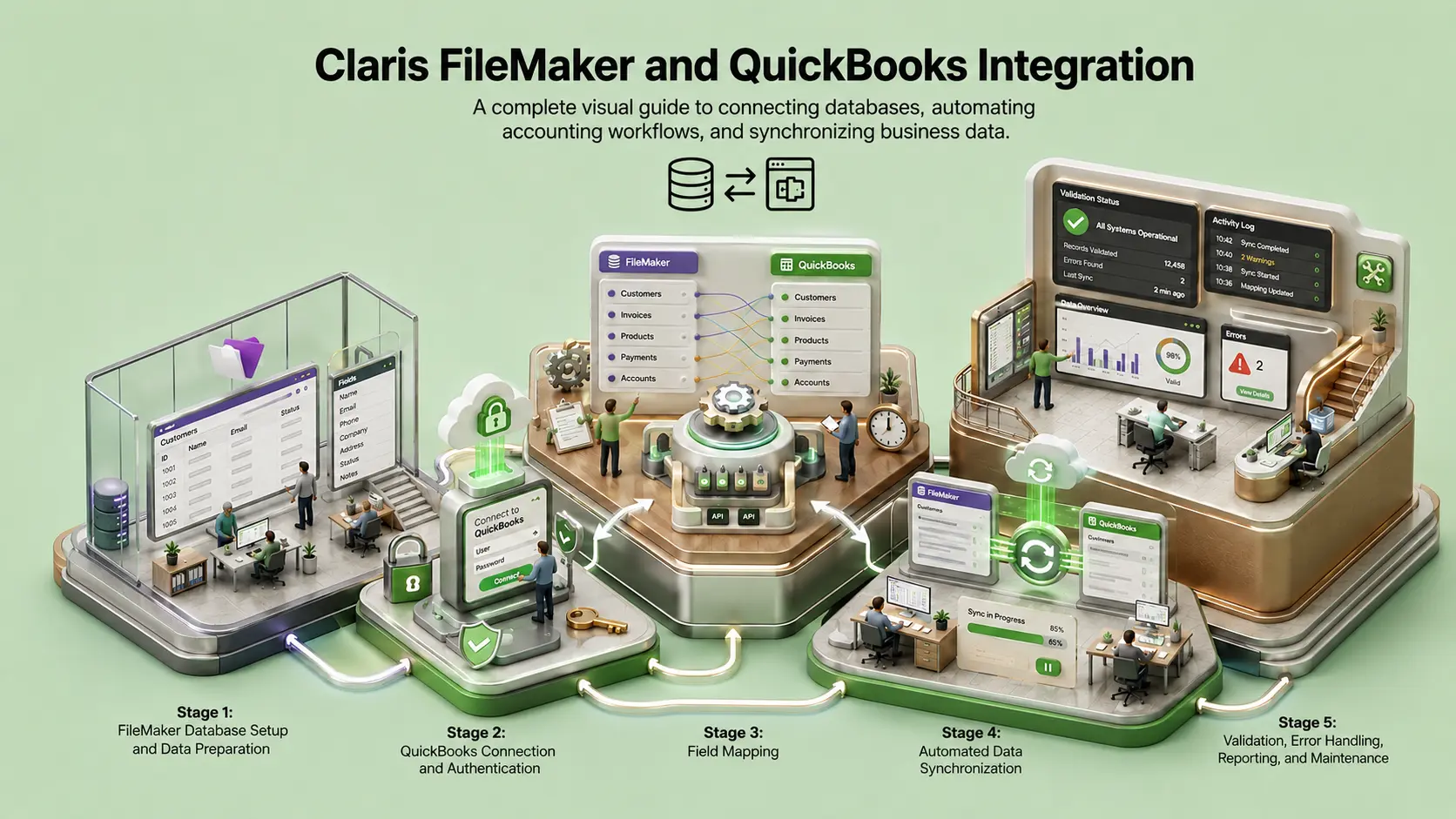
Imagine your sales team creates an order in Claris FileMaker. The customer details are correct, the products are selected, and the pricing has been approved.
But the invoice still needs to reach QuickBooks.
Someone could enter it manually. A prebuilt connector could transfer it automatically. Or your FileMaker software could communicate directly with the QuickBooks Online API.
All three approaches can move the data, but they do not offer the same level of control, visibility, flexibility, or long-term value.
So the real question is not whether Claris FileMaker and QuickBooks should be connected. It is whether you should use a prebuilt connector or build a direct API integration.
One Invoice, Three Journeys
Manual Entry
Flow: Claris FileMaker → An employee copies the information → QuickBooks
Main risk: Human error, delayed invoicing, and repeated data entry
Connector-based Integration
Flow: FileMaker → Claris Connect or a third-party connector → QuickBooks
Main trade-off: Faster setup, but the workflow depends on the connector’s supported actions and operating limits
Direct API Integration
Flow: FileMaker → QuickBooks Online API
Main trade-off: More development upfront, but greater control over how information is validated, transferred, monitored, and reconciled
What does a FileMaker connector actually do?
When businesses discuss a FileMaker and QuickBooks connector, they are usually referring to a prebuilt QuickBooks connector in Claris Connect or a third-party plug-in installed alongside FileMaker Pro software.
These tools are designed to reduce the amount of custom development required. You authorize QuickBooks, select a trigger, choose an action, map the relevant fields, and begin moving information.
Furnished Apartment vs Custom Home
A prebuilt connector is like renting a furnished apartment. You can move in quickly, the essential pieces are in place, but you cannot move every wall or redesign every room.
A direct Claris FileMaker integration is more like building a home around the way you live. It requires more planning and a larger upfront investment, but the structure can be shaped around your actual requirements.
Where a connector makes sense
Connectors are not merely temporary solutions. For many standard workflows, they can be a sensible and cost-effective option. If your business only needs to create a QuickBooks customer from a FileMaker record, generate a standard invoice, update payment status, and save the transaction ID back into FileMaker, a connector handles this efficiently.
Where connectors can reach their limits
Every prebuilt connector offers a defined set of triggers, searches, and actions. That creates a boundary. Imagine needing to search for an existing customer using several identifiers, group invoice lines according to internal billing rules, apply different classes, and retry only failed parts of a transaction. This is where convenience gradually becomes a constraint.
| Workflow Type | Connector Suitability |
|---|---|
Basic synchronization Customer → Invoice → Payment | High |
Conditional workflow Actions based on order type or payment status | Medium to High |
Custom accounting process Complex mappings, partial retries, reconciliation | Variable |
Business-critical infrastructure High volume, custom logic, strict monitoring | Requires Evaluation |
What a direct API integration changes
A direct API integration does not remove complexity. It changes who controls it. Instead of adapting your workflow to predefined actions, the integration is designed around your business.
Fits Your Process
Support custom field mappings, business-specific invoice structures, and conditional processing.
Capture Responses
Store requests, HTTP status, and QuickBooks transaction identifiers for complete visibility.
Smart Failure Handling
Different failures receive different responses. Retries for service failures, reviews for missing references.
What happens when a sync fails?
Authentication failure
The access token has expired
Validation failure
A required QuickBooks field is missing
Reference failure
Account, item, or tax code does not exist
Duplicate risk
Processed, but response not received
The True Cost Question
A common argument says that a connector costs money forever while a direct API integration is a one-time build. That is too simplistic. The accurate comparison is the total cost of ownership over the expected life of the integration.
Calculate the Hidden Cost
A cheaper integration that regularly creates duplicates, misses transactions, or requires manual reconciliation may become the more expensive system. Calculate the hidden cost of manual data correction:
Estimated Hidden Cost (5 Years)
$65,000
Myth vs Reality
Myth
Direct API integration is always cheaper
Reality
It may reduce middleware costs, but development, monitoring, infrastructure, and maintenance still carry a cost.
Myth
Connectors are only suitable for prototypes
Reality
A connector can support production workflows when its actions, limits, logging, and reliability match the business requirements.
Myth
Direct integration removes every third party
Reality
It removes a middleware layer. The system still depends on Claris, Intuit, infrastructure, and the team maintaining it.
Myth
Connectors require no technical work
Reality
Field mapping, accounting logic, validation, duplicate prevention, and exception handling still require careful configuration.
Score Your Integration
The decision becomes clearer when you stop asking "Which technology is better?" and start asking "What would happen if the integration failed, slowed down, created duplicates, or prevented us from changing our workflow?"
Check all that apply to your business:
A connector may be sufficient.
* This score is a discussion tool, not a substitute for a technical assessment.
How We Implement FileMaker and QuickBooks
Choosing an architecture is only the first step. The integration still needs to be mapped, developed, tested, deployed, and maintained. Alpha Dezine helps businesses connect Claris FileMaker and QuickBooks around the way their teams already work.
1. Discover
Understand the existing FileMaker and QuickBooks workflow.
2. Map
Define records, fields, ownership, approvals, and direction.
3. Design
Choose connector, direct API, or hybrid architecture.
4. Build
Develop auth, requests, validation, logging, and retry logic.
5. Test
Validate standard transactions and failure scenarios.
6. Launch
Deploy the integration into the production environment.
Ready to stop manual entry?
Connect Claris FileMaker and QuickBooks with a system built around your business rules.
Schedule Consultation*This article is provided for general informational purposes. Claris licensing, connector capabilities, QuickBooks API limits, and pricing may change. Confirm current requirements for your environment.




© 2026 Alpha Dezine. All Rights Reserved.
